Posts

ASP.NET Core: Using AutoMapper
Image
AutoMapper is a simple C# library that helps to transform one object into another object. This is a less configuration-based conventional object-to-object mapper library. This object-to-object mapping works by transforming the input object of one type to an output object of a different type.  Why the AutoMapper is needed? The main reason behind using AutoMapper is to make sure that we can hide the important properties of the core object (aka the domain object) from showing them directly to the client.  Let's take an example here, in any Employee Information System the actual Employee Domain object has various properties like Name, DeptName, Designation, Salary, Experience, TasksToPerform, etc. When this object is needed by the Accounting System, it just needs Name, DeptName, and Salary, so instead of passing the Employee object to the Accounting System with unnecessary data, it's better to create a separate ViewModel DTO with necessary properties for Accounting System and map ...

Node.js and Express: Accessing SQL Server Database for CRUD Operations

Image
In this article, we will see how we can use Node.js to build REST APIs using Express.js and access SQL Server Database. We will use mssql package to connect to the SQL Server database and perform CRUD Operations. The reason behind writing this article is to help the new Node.js learners design and Develop database-centric applications while they want to design and develop additional modules with existing business applications. I have already published an article on performing Database Operations using Node.js with Sequelize and PostgreSQL databases. You can read this article from this link . In the article, we will not use Sequelize but instead, we will see how we can use SQL Statements to perform database operations. Step 1: Create a folder named node-sqlaccess. We will use this folder as a project folder.    Open this folder in Visual Studio Code. Open the Terminal window or Command Prompt and navigate to node-sqlacess folder. Run the following command to create package...

ASP.NET Core 7: Implementing the Back-End for Front-End (BFF) Pattern in ASP.NET Core

Image
In my previous article , we have seen an implementation of the API Gateway in ASP.NET Core using Ocelot, in this article we will see an implementation of the Back-End for Front-End (BFF) pattern implementation in ASP.NET Core. With an expansion in Web-based applications, there are several technologies that have emerged to support web-based apps. In recent years we have shifted from thick-client applications to thin-client applications those interact with various Back-End services. There are several domains that have Web-based User interfaces and mobile-based user interfaces e.g. e-commerce apps, Banking, and Social Media Apps along with these UIs such applications also have complex server-side architectures, and these applications address such complex architectures using Microservices as backend services. If the UI is tightly coupled with backend services, then it is exceedingly difficult to use such backend services for other UI. This is where the BFF pattern comes in. Introduction to...

ASP.NET Core: Implementing API Gateway using Ocelot

Image
In this article, we will learn about creating API gateways for ASP.NET Core Applications using Ocelot. In my previous article , I have explained the process of creating resilient microservices where I have explained its need for application development. Microservices architectures are proven as a backbone of modern high availability-based application architectures. Since microservices provide a Techo-Agnostic approach to designing and developing microservices, it's important to make sure that instead of exposing the public endpoints of each microservice to the client the architecture must create an API gateway so that the client will be provided access to all microservices using a single gateway endpoint.  What is API Gateway? API Gateway acts as a FRONT-DOOR for all backend services. This provides a single access point for the business logic, and data from the backend services. The API Gateway has the following advantages Isolates the client application from knowing about the actu...

React.js with TypeScript: Sharing Data Across Components using React.Context

Image
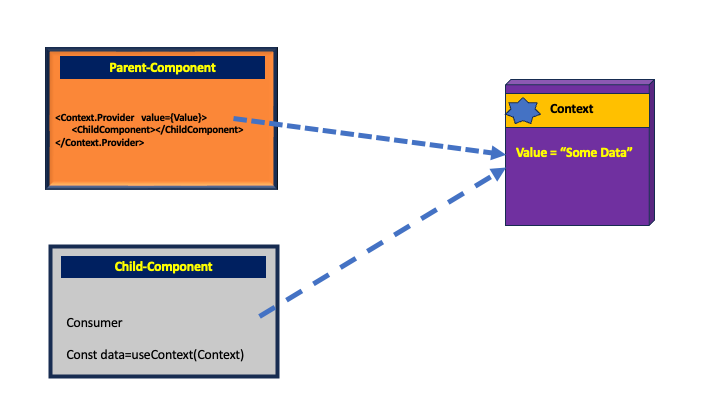
In this article, we will see the step-by-step implementation of using " React.Context" to share data across components. We will use TypeScript as a programming language to implement the code for this article.    Why TypeScript? TypeScript is an open-source language that increases JavaScript application productivity by providing a type system. TypeScript is a typed JavaScript that compiles to plain JavaScript. TypeScript delivers a unique and easy approach to building front-end applications. React Context      React.js is a JavaScript Library for building interactive UI. This library is used to build the composable UI. In such cases, the UI may contain multiple components and these components may have a Parent-Child relationship across them. With the UI having such type of relationship, we may have the case of sharing data across the components. The Context provides a way to pass data through the components tree without having to pass props down manually at...